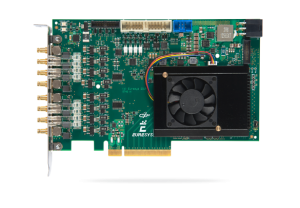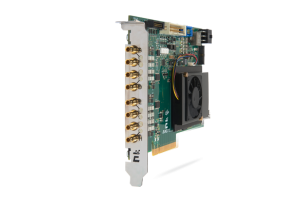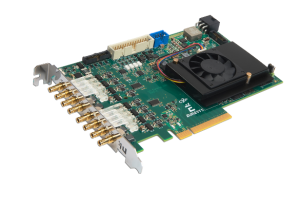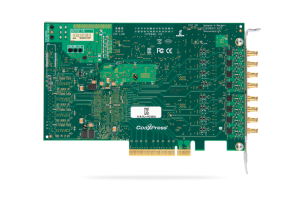

Coaxlink Octo
PCIe 3.0 eight-connection CoaXPress frame grabber
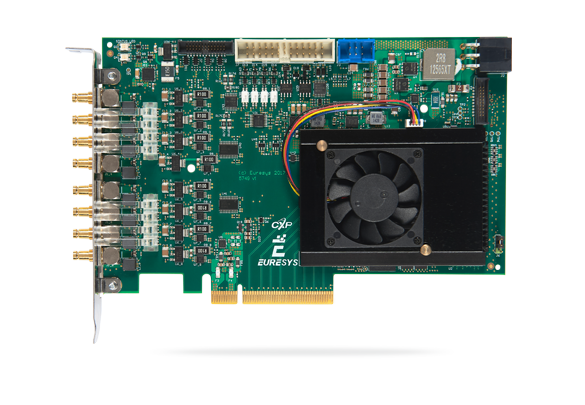
- Eight CoaXPress CXP-6 connections: 5,000 MB/s camera bandwidth
- Connect up to eight CoaXPress cameras to one card
- PCIe 3.0 (Gen 3) x8 bus: 6,700 MB/s bus bandwidth
- Feature-rich set of 10 digital I/O lines
- Extensive camera control functions
- Memento Event Logging Tool
PCIe 3.0 (Gen 3) x8 bus
- 7,800 MB/s peak bus bandwidth
- 6,700 MB/s sustained bus bandwidth
Acquire images from the fastest and highest resolution cameras
- Highest data acquisition rate in the industry
- 50 Gbit/s (5,000 MB/s) bandwidth from camera to host PC memory
Long cable support
- 40 meters at CXP-6 speed (6.25 Gbps)
- 100 meters at CXP-3 speed (3 Gbps)

Power over CoaXPress
- Power over CoaXPress : Feed your camera up to 17 W per channel under 24 VDC with automatic device detection, measurement and overload protection.
- Total and per-channel voltage and current measurement is possible, allowing validation and performance deviation monitoring.
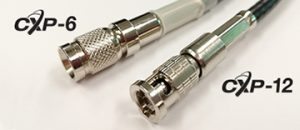
Use standard coaxial cables
- A single inexpensive cable for data transfer, camera control, trigger and power supply
- Top reliability and flexibility, performs in the harshest environments
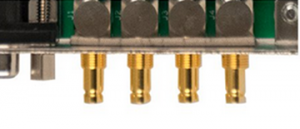
Robust connectors for reliable connections
- Coaxlink CXP-6 uses DIN 1.0/2.3 connectors with push/pull latching system

Connect up to 8 cameras to a single Coaxlink card
Coaxlink Octo also supports a 16-connection cameras connected to two cards.
Memento Event Logging Tool
- Memento is an advanced development and debugging tool available for Coaxlink cards.
- Memento records an accurate log of all the events related to the camera, the frame grabber and its driver as well as the application.
- It provides the developer with a precise timeline of time-stamped events, along with context information and logic analyzer view.
- It provides valuable assistance during application development and debugging, as well as during machine operation.
CustomLogic: Your own FPGA logic!
- CustomLogic is an FPGA design kit enabling the design and upload of FPGA code to a Coaxlink board
- It is compatible with the Coaxlink Octo and Coaxlink Quad CXP-12 for which up to 70% of their Xilinx Kintex Ultrascale XCKU035 FPGA resources are available.
- The design phase uses the Xilinx Vivado development tools (not provided)
- Using CustomLogic does not require any additional hardware
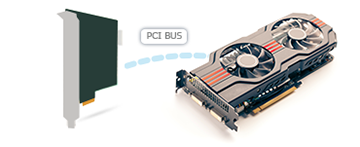
Direct GPU transfer
- Sample programs for AMD DirectGMA and NVIDIA (CUDA) available.
- Direct GPU transfer eliminates unnecessary system memory copies, lowers CPU overhead, and reduces latency, resulting in significant performance improvements in data transfer times for applications.
- Direct capture of image data to GPU memory is available using AMD’s DirectGMA. Compatible with AMD FirePro W5x00 and above and all AMD FirePro S series products.

General purpose I/O lines
- Compatible with a wide range of sensors and motion encoders.
- High-speed differential inputs: Quadrature motion encoder support up to 5 MHz.
- Isolated current-sense inputs: 5V, 12V, 24V signaling voltages accepted, up to 50 kHz, individual galvanic isolation up to 250VDC and 170VAC RMS.
- Isolated contact outputs.
- High-speed 5V-compliant TTL inputs/ LVTTL outputs.

High-performance DMA (Direct Memory Access)
- Direct transfer into user-allocated memory and hardware boards that expose PCI addresses
- Hardware scatter-gather support
- 64-bit addressing capability
Area-scan triggering capabilities
- A trigger is used to start the acquisition when the part is in position. Hardware triggers come from the Coaxlink’s I/O lines. Software triggers come from the application.
- An optional trigger delay is available to postpone the acquisition for a programmable time.
- A trigger decimation function allows to skip some of the triggers.
- Camera exposure control allows the application to control the exposure time of the camera.
- When the acquisition starts, at the appropriate timing, the Coaxlink board generates a signal to control an illumination device connected to one of its output lines.
Line-scan triggering capabilities 1/2
Coaxlink supports continuous web scanning (to inspect infinite, continuously moving surfaces without losing a single line) and discrete object scanning (to acquire the image of objects moving in front of the camera).
- A trigger is used to start the acquisition when the part is in position. Hardware triggers come from the board’s I/O lines. Software triggers come from the application.
- After it is started, the acquisition either:
- Continues indefinitely (for web inspection applications)
- Continues for a programmable number of lines (to acquire the image of objects of a known length)
- Continues until an end trigger is received (to acquire the image of objects of a variable length)
- An optional trigger delay is available to postpone the beginning of the acquisition for a programmable number of lines.
Line-scan triggering capabilities 2/2
- The Coaxlink frame grabber controls the camera scanning rate based on the signals received from a motion encoder. When the parts move faster, the acquisition line rate of the camera increases. When the parts move slower, the acquisition line rate of the camera decreases.
- The Coaxlink boards interpret A/B signals from quadrature motion encoders to know in which direction (forward or backward) the part is moving.
- Optionally, the Coaxlink board can be instructed to acquire lines only when the object is moving forward or only when the object is moving backward.
- A feature called Backward Motion Cancellation stops the acquisition when a backward motion is detected. The line acquisition automatically resumes when the motion is again in the forward direction, at the exact place where the acquisition was interrupted.
- A Rate Converter allows the camera to acquire lines at any programmable resolution lower or higher than the resolution of the motion encoder. This gives the designer incredible freedom and flexibility during the development of the application.
- A Rate Divider allows the camera to acquire lines at a resolution lower than the resolution of the motion encoder. It divides the frequency of the incoming encoder signal by a programmable integer.
Flexible line-scan camera operation with the rate converter
- The rate converter is a smart, programmable frequency multiplier/divider.
- Used with motion encoders and line-scan cameras, it allows the user to choose the aspect ratio of the pixels in the image.
- It provides a way to calibrate the acquisition chain to easily reach square (1:1 aspect ratio) pixels.
Windows, Linux and macOS drivers available
- Including support for Intel 32-bit and 64-bit platforms as well as ARM 64-bit platforms
Compatible with eGrabber
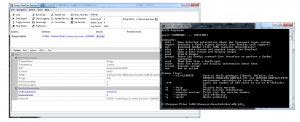
- eGrabber Studio: eGrabber’s new interactive evaluation and demonstration application
- GenICam Browser: An application giving access to the GenICam features exposed by the GenTL Producer(s)
- GenTL Console: A command-line tool giving access to the functions and commands exposed by the Euresys GenTL Producer

Compliant with GenICam
Including support for
- GenApi
- The Standard Feature Naming Convention (SFNC)
- GenTL